
Mechanical keyboards are built to last, with some able to endure over 50 million key presses. These keyboards use individual mechanical switches for each key, offering precise feedback, durability, and a satisfying typing experience. Gamers, writers, and tech enthusiasts often prefer them for their responsiveness and longevity.
In this guide, we explore how mechanical keyboards function, their unique features, and why they remain popular among users. For a broader view, you can also check out our article covering various keyboard types, helping you choose the one that best fits your needs and typing style.
Read More: Computer Hardware Types Explained
What Is a Mechanical Keyboard?
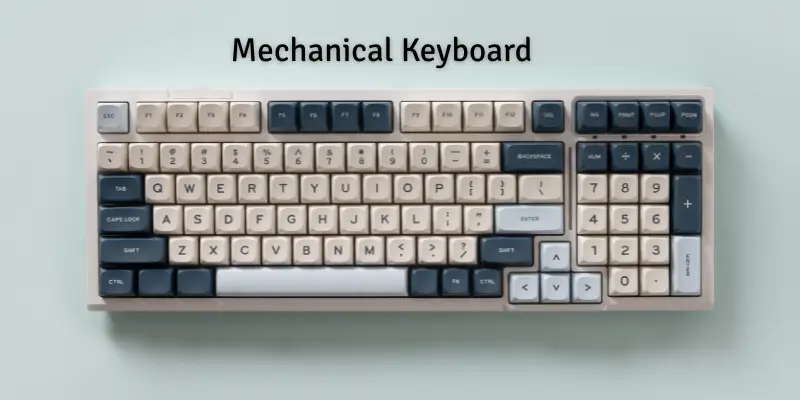
A mechanical keyboard features individual switches beneath each key, allowing fast and precise signal transmission when pressed. Depending on the switch type, keys can produce a soft or clicky sound. Known for durability and long-lasting performance, mechanical keyboards are popular among users who value speed, accuracy, and improved typing control. Ideal for gamers, writers, and professionals, these keyboards offer a satisfying typing experience while maintaining reliability over years of use. Their combination of tactile feedback, responsiveness, and sturdiness makes them a preferred choice for anyone seeking an upgraded keyboard experience.
How Does a Mechanical Keyboard Work?
Mechanical keyboards rely on individual switches beneath each key to transmit signals quickly and accurately. Here’s the step-by-step process:
- Press a key – Your finger pushes down a key.
- Switch moves – The mechanical switch beneath the key is activated.
- Switch contacts metal – The switch touches a metal part or circuit inside the keyboard.
- Signal is created – This contact generates a small electric signal.
- Signal reaches computer – The keyboard sends the signal to your computer.
- Character appears – The computer displays the corresponding letter or command on screen.
Types of Mechanical Keyboards
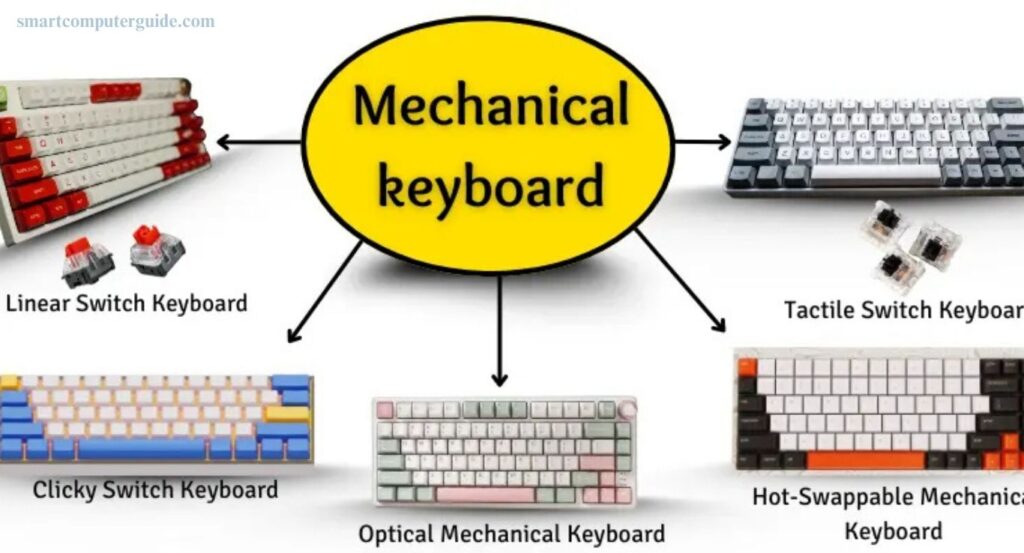
Mechanical keyboards come in various types, each offering a unique feel and sound:
- Linear Switch Keyboard – Keys move smoothly with no bump or sound, ideal for gaming.
- Tactile Switch Keyboard – Provides a small bump when pressed, giving clear feedback that the key registered.
- Clicky Switch Keyboard – Produces a loud click with each press, favored by typists who enjoy audible feedback.
- Hot-Swappable Mechanical Keyboard – Allows you to change switches without tools, making it easy to customize.
- Optical Mechanical Keyboard – Uses light-based signals instead of metal, offering faster response and longer durability.

Types of Mechanical Keyboard Layouts
Mechanical keyboards are available in various layouts, each with a unique size and key arrangement:
- Full-Size (100%) – Includes all keys, including number pad and arrow keys.
- Tenkeyless (TKL) – Removes the number pad for a compact design.
- 75% Layout – Keeps all essential keys close together, saving desk space.
- 65% Layout – Omits function keys and number pad but retains arrow keys.
- 60% Layout – Includes only the main typing keys for minimalists.
- 40% Layout – Extremely compact, typically used by experts.
- Split Keyboard – Divides into two halves for ergonomic typing.
- Ortholinear Layout – Arranges keys in straight, grid-like lines for efficiency.
Types of Mechanical Keyboard Switches by Color
Mechanical keyboard switches come in different colors, each offering a unique feel and sound:
- Red Switch – Smooth and light, quiet; popular with gamers for fast key presses.
- Blue Switch – Clicky and tactile; preferred by typists who enjoy audible feedback.
- Brown Switch – Soft with minimal noise; suitable for both typing and gaming.
- Black Switch – Heavy and firm; ideal for fast typists seeking control.
- Green Switch – Loud and strong; loved by users who enjoy clicky keys.
- Yellow Switch – Smooth, quiet, and responsive; great for gamers.
- White Switch – Light with a soft click; offers a smooth, comfortable typing feel.
Advantages and Disadvantages of Mechanical Keyboards
Mechanical keyboards use physical switches beneath each key, offering a distinct typing experience. While many users love them for performance and feel, they come with pros and cons.
Advantages:
- Durable and long-lasting
- Comfortable for extended typing sessions
- Fast and precise key response
- Ideal for gaming
- Clicky sound provides tactile feedback
- Easy to clean
- Switches can be replaced
- Handles heavy daily use well
Disadvantages:
- More expensive than standard keyboards
- Louder than membrane keyboards
- Heavier and less portable
- Takes up more desk space
- Not suitable for quiet environments
- Some switches require more finger pressure
- Certain keys may feel overly sensitive
- Typing experience may not suit everyone
Frequently Asked Questions
What is a mechanical keyboard?
A mechanical keyboard uses individual switches under each key, providing tactile feedback, durability, and faster typing response.
How does a mechanical keyboard work?
Each key has a switch that completes an electrical circuit when pressed, sending a signal to your computer to register the key.
What are the types of mechanical keyboard switches?
Common switches include Red (smooth), Blue (clicky), Brown (tactile), Black (heavy), Green (loud), Yellow (quiet), and White (soft click).
Which switch is best for gaming?
Red and Yellow switches are popular among gamers due to their smooth, light, and quiet keystrokes for fast reactions.
What are mechanical keyboard layouts?
Layouts include Full-Size (100%), Tenkeyless (TKL), 75%, 65%, 60%, 40%, Split, and Ortholinear, offering different key arrangements and sizes.
Are mechanical keyboards better than membrane keyboards?
Yes, for durability, typing speed, tactile feedback, and gaming performance, but they can be louder and more expensive.
Can I replace mechanical keyboard switches?
Yes, hot-swappable keyboards allow easy switch replacement without soldering or tools.
What are the disadvantages of mechanical keyboards?
They are heavier, louder, more expensive, and may take more desk space compared to regular keyboards.
Who should use a mechanical keyboard?
Gamers, typists, programmers, and anyone seeking precise, durable, and comfortable typing will benefit from mechanical keyboards.
Conclusion
Mechanical keyboards offer a superior typing experience with durability, precision, and customizable features. Their individual switches provide tactile feedback, fast response, and long-lasting performance, making them ideal for gamers, writers, and professionals. While they can be louder, heavier, and more expensive than standard keyboards, the benefits often outweigh the drawbacks for those seeking comfort, speed, and control. With various switch types, layouts, and colors, mechanical keyboards can be tailored to your typing style and needs.