
Understanding computer software can be confusing, but it’s essential for using your devices effectively. Software refers to programs and applications that make your hardware functional, enabling tasks from browsing the web to running complex programs. Unlike hardware, which is the physical part of your computer, software is intangible but drives every action your device performs.
Grasping the difference between hardware and software helps you troubleshoot issues, optimize performance, and make better tech choices. Learning how software works empowers you to use computers more efficiently and ensures you get the most out of your technology every day.
Read More: Visual Design: From Traditional Art to Digital Innovation
What is Computer Software?
Computer software is the set of programs that makes a computer functional. It provides instructions that allow the computer to perform tasks, from word processing and drawing to gaming and browsing. Unlike hardware, software is intangible you cannot physically touch it but it drives every action your device performs. Without software, even the most powerful computer is just a collection of components with no purpose.
Understanding software helps you use your computer effectively, run applications smoothly, and appreciate the difference between the hardware you see and the programs that power it behind the scenes.
Importance of Computer Software
Computer software is essential for turning a computer into a functional and interactive tool. Its significance includes:
- Supports Hardware: Works with hardware to perform tasks and make devices useful.
- Increases Productivity: Enables users to complete work, study, or entertainment tasks faster.
- Enhances Creativity: Provides tools for designing, creating, and innovating, such as graphic or video software.
- Improves Communication: Apps like email and messaging keep people connected globally.
- Data Management: Allows efficient storage, retrieval, and processing of large amounts of information.
Software powers every function, making computers indispensable in daily life.
How Does Computer Software Work?
Computer software enables a computer to function by communicating with hardware to process data and deliver results. The workflow includes:
- Input Stage: Users provide data through devices like a keyboard or mouse, which the software captures.
- Processing: The software sends this data to the CPU for calculations or operations based on programmed instructions.
- Interaction with Hardware: Software directs hardware components—such as memory, storage, and display—to execute commands.
- Output Stage: Results are presented on the screen or other devices, like printers.
- Feedback Loop: Users can input new data, and the software updates outputs continuously.
Types of Computer Software
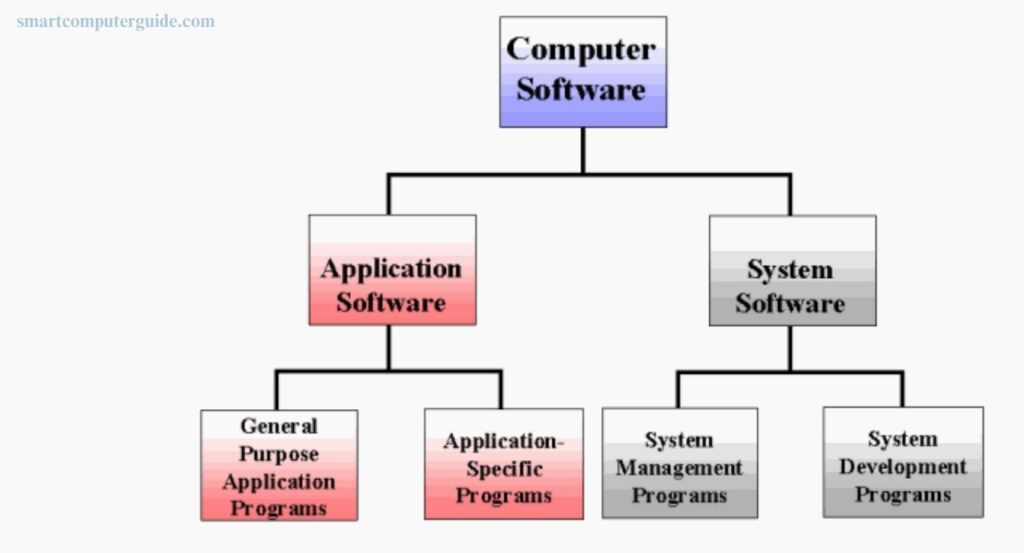
Computer software comes in various types, each serving a specific role to make computers work efficiently:
- System Software: Manages computer hardware and ensures all components work together, like the operating system.
- Application Software: Allows users to perform tasks such as writing, gaming, or browsing.
- Development Software: Helps create programs and apps for computers and devices.
- Programming Software: Provides tools for developers to write, test, and debug code.
- Middleware: Enables different programs to communicate and share data smoothly.
- Utility Software: Maintains performance by managing files and fixing issues.
- Firmware: Built into devices like printers and TVs, guiding hardware operations.
- Driver Software: Connects computers to external devices, ensuring they function correctly.
Uses of Computer Software
Computer software simplifies tasks, improves communication, and helps manage information. Key uses include:
- Run the Computer: Operating systems control all computer functions.
- Browse the Internet: Web browsers access websites and information.
- Write Documents: Word processors create and edit text.
- Play Media: Media players handle audio and video files.
- Protect Data: Antivirus software removes threats and keeps files safe.
- Edit Images: Graphics software creates and modifies pictures.
- Communicate: Messaging apps and email connect people instantly.
- Manage Data: Database software organizes and stores information efficiently.
- Host Meetings: Video conferencing software enables virtual collaboration.
- Entertainment: Game software provides fun and interactive experiences.
Examples of Computer Software
Computer software enables a variety of tasks on a computer. Here are 10 common examples and their uses:
- Windows 10: Runs the computer and manages hardware efficiently.
- Google Chrome: Allows users to browse the internet and access websites.
- Microsoft Word: Creates and edits documents easily.
- VLC Media Player: Plays audio and video files.
- Avast Antivirus: Protects the computer from viruses and malware.
- Adobe Photoshop: Edits and designs images creatively.
- WhatsApp: Enables online chatting and voice/video calls.
- Excel: Creates and manages spreadsheets.
- Zoom: Hosts video meetings and online classes.
- PowerPoint: Designs and presents slides for presentations.
Advantages and Disadvantages of Computer Software
Computer software boosts productivity and simplifies tasks, but it also comes with limitations.
Advantages:
- Speeds up work and automates repetitive tasks
- Enhances communication and collaboration
- Stores and manages data efficiently
- Provides entertainment and creative tools
- Improves accuracy and reduces human effort
- Supports learning, online shopping, and business management
Disadvantages:
- Can be costly and require regular updates
- Needs compatible hardware and sufficient storage
- May pose security risks or system crashes
- Some software needs internet access
- Can be hard for beginners and may contain bugs
Frequently Asked Questions
What is computer software?
Computer software is a set of programs that instructs a computer to perform tasks, making hardware functional.
What are the main types of software?
The main types are system software, application software, development software, programming software, middleware, utility software, firmware, and drivers.
How does software work?
Software processes user inputs, interacts with hardware, executes instructions, and provides output, often in a continuous feedback loop.
Why is software important?
It enables computers to perform tasks, improves productivity, enhances creativity, and supports communication and data management.
Can software run without hardware?
No. Software requires hardware to execute instructions and display results.
What are common examples of software?
Examples include Windows 10, Google Chrome, Microsoft Word, VLC Media Player, Adobe Photoshop, WhatsApp, Excel, Zoom, and PowerPoint.
What are the advantages of software?
It increases efficiency, automates tasks, improves accuracy, supports learning, and provides entertainment and business solutions.
What are the disadvantages of software?
It can be expensive, require updates, have security risks, consume storage, need internet access, and may be difficult for beginners.
Conclusion
Computer software is the backbone of modern computing, transforming hardware into a powerful and versatile tool. It enhances productivity, supports creativity, enables communication, and simplifies data management. While software offers numerous benefits, including automation, accuracy, and entertainment, it also comes with challenges such as costs, updates, security risks, and learning curves. Understanding different types of software and how they work helps users make the most of their devices.