
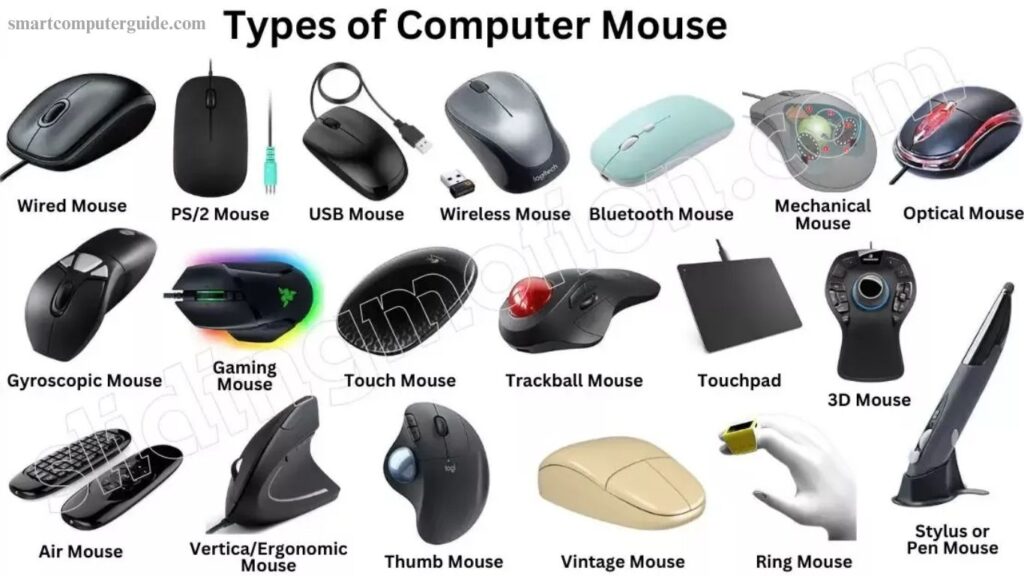
Using a computer without a mouse would make simple tasks like drawing, gaming, or navigating software much more difficult. Despite its small size, the computer mouse plays a crucial role in making interactions smooth and precise. There are different types of mice, such as wired, wireless, ergonomic, and gaming, each designed to meet specific needs.
Understanding how a computer mouse works, its features, and its benefits helps users choose the right one for productivity and comfort. Additionally, exploring other computer components reveals how each part works together, highlighting the mouse’s importance in overall computing efficiency.
Read More: Computer Mouse Types: Features, Names, and Uses
What is a Computer Mouse?
A computer mouse is a compact input device that allows you to control the cursor on your screen with ease. By moving it across a flat surface, you can select, open, or drag files and applications effortlessly. Most mice feature two buttons and a central scroll wheel, which send commands to the computer when clicked. This simple yet essential device enhances navigation, making tasks faster, smoother, and more efficient. Whether for work, gaming, or everyday use, the computer mouse remains a vital tool for any computer user.
History of the Computer Mouse
The computer mouse was invented by Douglas Engelbart in 1964 to make computers easier to use. The first model was made of wood and featured a single button. In the 1970s, it was improved with additional buttons and a more ergonomic design, becoming compatible with early personal computers. During the 1980s, companies like Apple and Microsoft popularized the mouse by including it with their systems, making computers more accessible to everyday users. Today, mice come with multiple buttons, use optical or laser technology for smooth movement, and wireless models are widely used.
Types of Computer Mouse
Computer mice come in various types, each designed to enhance usability and performance:
- Mechanical Mouse: Uses a rolling ball to detect movement.
- Optical Mouse: Tracks movement with light for smooth control.
- Laser Mouse: Offers precise cursor control using a laser beam.
- Wireless Mouse: Connects via Bluetooth or USB without cables.
- Trackball Mouse: Moves the cursor by rolling a ball on top.
- Gaming Mouse: Built for gamers with extra buttons and fast response.
- Ergonomic Mouse: Designed to fit the hand comfortably and reduce strain.
How a Computer Mouse Works
A computer mouse allows you to control the pointer on your screen with precision. Moving the mouse sends signals to the computer, which translates them into pointer movement. Clicking buttons or using the scroll wheel communicates commands like selecting, opening, or scrolling.
Step-by-Step Functioning:
- Detect Movement: Sensors track your hand’s motion.
- Send Signals: Signals are transmitted via cable or wireless connection.
- Move Pointer: The computer moves the cursor according to the signals.
- Click Buttons: Commands are sent when buttons are pressed.
- Scroll Wheel: Rotating the wheel scrolls content up or down.
Uses of a Computer Mouse
A computer mouse simplifies tasks and improves efficiency, allowing you to navigate and interact with your computer easily. Key uses include:
- Open Files: Click to access folders, files, or programs.
- Select Items: Move the pointer and choose objects quickly.
- Drag and Drop: Shift items by holding a button while moving the mouse.
- Scroll Pages: Use the wheel to move up or down content.
- Play Games: Control movement and actions in games.
- Draw and Design: Create shapes, lines, or graphics on-screen.
- Edit Text: Place the cursor and select text for editing.
Parts of a Computer Mouse
A computer mouse consists of several key parts, each with a specific function to ensure smooth operation:
- Left Button: Click to select or open items.
- Right Button: Access additional options or menus.
- Scroll Wheel: Scroll up and down pages easily.
- Body/Case: Protects the internal components.
- Sensor: Detects movement on the surface.
- Cable (Wired Mouse): Connects the mouse to the computer.
- Battery (Wireless Mouse): Powers the mouse.
- LED or Laser Light: Assists the sensor in tracking movement.
Common Computer Mouse Problems and Solutions
Sometimes a computer mouse may not function properly, but most issues can be fixed easily:
- Pointer Doesn’t Move: Check the cable or replace batteries for wireless mice; restarting the computer can help.
- Slow Movement: Clean the mouse bottom and adjust pointer speed in settings.
- Buttons Unresponsive: Test on another computer; replace if faulty.
- Scroll Wheel Not Working: Clean gently and update the mouse driver.
- Frequent Disconnections: Try a different USB port or replace the battery.
- Pointer Jumps: Use a smooth, clean surface for better sensor tracking.
Mouse Cleaning Tools
Over time, a computer mouse can gather dust and dirt, affecting performance. Using proper cleaning tools helps maintain hygiene, ensures smooth operation, and extends the mouse’s lifespan.
Essential Cleaning Tools:
- Microfiber Cloth: Gently removes dust and fingerprints.
- Compressed Air Can: Cleans hard-to-reach areas like buttons and cracks.
- Cotton Swabs: Reaches tight spaces for precise cleaning.
- Isopropyl Alcohol: Removes germs and sticky residue when used with a cloth.
- Soft Brush: Clears dust from the surface and sensor.
- Cleaning Gel: Picks up dust from crevices effectively.
Advantages and Disadvantages of a Computer Mouse
A computer mouse makes navigating and controlling a computer faster and more efficient, but it also has some limitations.
Advantages:
- Fast pointer movement and easy clicking
- Smooth scrolling and text selection
- Compatible with most computers
- Enhances gaming and graphic design control
- Supports left and right clicks
- Easy connection and saves time
Disadvantages:
- Requires a flat surface
- Needs cleaning and maintenance
- Wireless models use batteries and may disconnect
- Can cause hand strain with prolonged use
- Limited range and may not work on all surfaces
Frequently Asked Questions
What is a computer mouse?
A computer mouse is an input device that controls the cursor on a screen, allowing users to click, select, and navigate easily.
Who invented the computer mouse?
Douglas Engelbart invented the first computer mouse in 1964, originally made of wood with a single button.
What are the different types of computer mice?
Types include mechanical, optical, laser, wireless, trackball, gaming, and ergonomic mice.
How does a computer mouse work?
It detects hand movement through sensors and sends signals to the computer to move the pointer and register clicks or scrolls.
What are the main parts of a computer mouse?
Key parts include left/right buttons, scroll wheel, body/case, sensor, cable or battery, and LED or laser light.
What are common problems with a mouse?
Issues include unresponsive buttons, slow pointer, disconnected wireless mouse, faulty scroll wheel, and pointer jumping.
How do I clean a computer mouse?
Use microfiber cloths, compressed air, cotton swabs, cleaning gel, soft brushes, and isopropyl alcohol for deep cleaning.
What are the advantages and disadvantages of a mouse?
Advantages: faster navigation, easy clicking, improved gaming and design control. Disadvantages: needs flat surface, may cause hand strain, requires cleaning, and wireless models need batteries.
Conclusion
The computer mouse is an essential tool that simplifies navigation, improves efficiency, and enhances user experience. From basic clicking to gaming and graphic design, different types of mice serve various needs. Understanding its parts, uses, and proper maintenance ensures smooth performance and a longer lifespan. Despite minor drawbacks, the mouse remains a vital device for both casual and professional computer users.