
Optical storage devices, including CDs and DVDs, have been a trusted solution for storing music, movies, and data for over 40 years. Utilizing advanced laser technology, these devices can read and write information efficiently, offering a reliable, portable, and durable way to manage digital files. In this comprehensive guide, you’ll explore the different types of optical storage devices, their practical examples, and how they function.
Whether you’re curious about their technology, benefits, or modern usage, this complete guide to storage types provides all the essential information you need to understand optical storage devices thoroughly.
Read More: LED vs LCD Monitors: Choosing the Best for Home, Office, and Gaming
What is Optical Storage?
Optical storage is a type of computer storage that uses lasers to read and write data on discs like CDs, DVDs, and Blu-ray discs. The laser scans tiny tracks on the disc to access information, allowing you to store music, videos, software, and backup files. Portable and easy to use, optical storage is ideal for sharing, archiving, and safely preserving digital data.
How Do Optical Storage Devices Work?
Optical storage devices use laser technology to read and write data on discs like CDs, DVDs, and Blu-ray. Here’s how they work:
- Insert the disc into the drive.
- A laser shines on the disc surface.
- The disc contains tiny marks called pits and lands.
- The laser interprets these marks as digital data (0s and 1s).
- The drive converts the laser signals into readable files.
- Your computer displays the data, such as songs, videos, or documents.
- For rewritable discs, the laser can erase and store new data.
History of Optical Storage
The first optical storage device, the compact disc (CD), was introduced in 1982 for music and computer files. In 1995, DVDs (Digital Versatile Discs) arrived, offering higher storage capacity. Blu-ray Discs followed in 2006, designed for high-quality videos and games. While USB drives and cloud storage dominate today, DVDs and Blu-ray Discs remain popular for storing movies, software, and backups.
Examples of Optical Storage
Optical storage devices come in various forms, used to store music, videos, software, and other digital data. Here are the most common types:
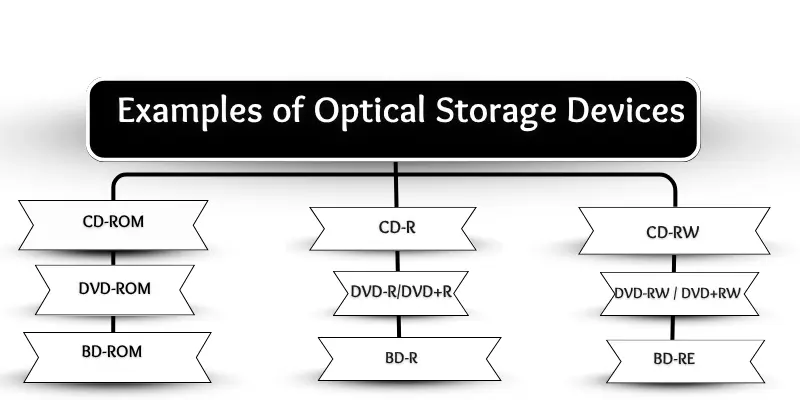
CD-ROM
Compact Disc Read-Only Memory (CD-ROM) allows you to read data but not modify it. It is commonly used for music, games, and software installations.
CD-R
CD-R (Recordable) lets you write data once. After that, the content cannot be erased or changed, making it ideal for songs, videos, or files you want to preserve.
CD-RW
CD-RW (Rewritable) allows data to be written, erased, and rewritten multiple times. It works like a reusable notebook for files that change frequently.
DVD-ROM
Digital Versatile Disc Read-Only Memory (DVD-ROM) is read-only and widely used for movies, software, and game installations.
DVD-R / DVD+R
These recordable DVDs let you write data once, perfect for long-term storage of videos, music, and important files.
DVD-RW / DVD+RW
Rewritable DVDs can be written, erased, and reused multiple times, ideal for changing videos, documents, or photos.
BD-ROM
Blu-ray Disc Read-Only Memory (BD-ROM) uses a blue laser to read data. It is read-only and commonly used by studios for HD movies.
BD-R
Blu-ray Disc Recordable (BD-R) allows one-time writing of large files like HD videos, games, or data, with higher capacity than CDs or DVDs.
BD-RE
Blu-ray Disc Recordable Erasable (BD-RE) can be written, erased, and reused multiple times, making it perfect for backups, large files, and sharing data.
Uses of Optical Storage
Optical storage is widely used at home, schools, and offices to store, share, and preserve data. Common uses include:
- Storing music: Audio CDs hold songs for playback.
- Watching movies: DVDs and Blu-ray discs store full-length films.
- Backing up data: Important files are safely preserved on discs.
- Installing software: Many programs are distributed on CDs or DVDs.
- Saving photos and videos: Personal media can be burned to discs for future use or sharing.
- Playing video games: Games are often installed and played from optical discs.
- Educational content: Schools use CDs and DVDs for lessons and tutorials.
- Document storage and archiving: Files, reports, and old data are kept for long-term reference.
Advantages and Disadvantages of Optical Storage
Optical storage devices offer several benefits but also have limitations.
Advantages
- Portable and lightweight
- Affordable and widely available
- Long-lasting and durable for backups
- Safe from most viruses
- Easy to use, no electricity required for storage
- Compatible with many computers
- Ideal for sharing data
Disadvantages
- Slower than USB drives or hard drives
- Prone to scratches and physical damage
- Limited storage capacity
- Requires a disc drive, which is uncommon in modern laptops
- Writing and updating data can be time-consuming
- Some discs are write-once only, unsuitable for very large files
Frequently Asked Questions
What is optical storage?
Optical storage is a type of digital storage that uses lasers to read and write data on discs like CDs, DVDs, and Blu-ray discs.
How do optical storage devices work?
They use a laser to scan tiny pits and lands on the disc, converting them into digital data that computers can read.
What are common types of optical storage?
CD-ROM, CD-R, CD-RW, DVD-ROM, DVD-R/DVD+R, DVD-RW/DVD+RW, BD-ROM, BD-R, and BD-RE are the most common types.
What are the uses of optical storage?
Optical storage is used for storing music, movies, photos, videos, software, games, educational content, backups, and documents.
What are the advantages of optical storage?
It is portable, affordable, virus-resistant, long-lasting, easy to use, and ideal for sharing or backing up data.
What are the disadvantages of optical storage?
It is slower than USB or hard drives, prone to scratches, has limited storage, and requires a disc drive.
Can you rewrite data on optical discs?
Yes, discs like CD-RW, DVD-RW, DVD+RW, and BD-RE can be rewritten multiple times, while CD-R, DVD-R, and BD-R are write-once.
Are optical storage devices still used today?
Yes, though USB drives and cloud storage are more common, optical discs are still used for movies, backups, and archival purposes.
How long does data last on optical discs?
With proper care, optical discs can last 10–50 years, making them suitable for long-term data storage.
Can optical storage store large files?
Blu-ray discs (BD-R/BD-RE) can store large files like HD movies and games, but CDs and DVDs have limited capacity.
Conclusion
Optical storage devices, including CDs, DVDs, and Blu-ray discs, have been a reliable method for storing, sharing, and backing up data for decades. They offer portability, virus resistance, and long-term storage, making them ideal for music, movies, software, photos, and important files. While newer technologies like USB drives and cloud storage have become more common, optical storage remains valuable for archiving, media distribution, and data preservation.