
Keyboard and mouse rank among the most widely used computer input devices worldwide. People rely on them every day to type text, navigate screens, control software, and complete digital tasks efficiently. Despite constant use, many users still confuse their functions or overlook how each device serves a distinct purpose.
This guide clearly explains the difference between keyboard and mouse using simple, practical language. You will learn how keyboards focus on text entry, shortcuts, and commands, while mice specialize in pointing, clicking, scrolling, and visual navigation. Understanding these differences improves productivity, accuracy, and computer usage for beginners and experienced users alike.
Read More: Types of computer speakers
Difference between keyboard and mouse
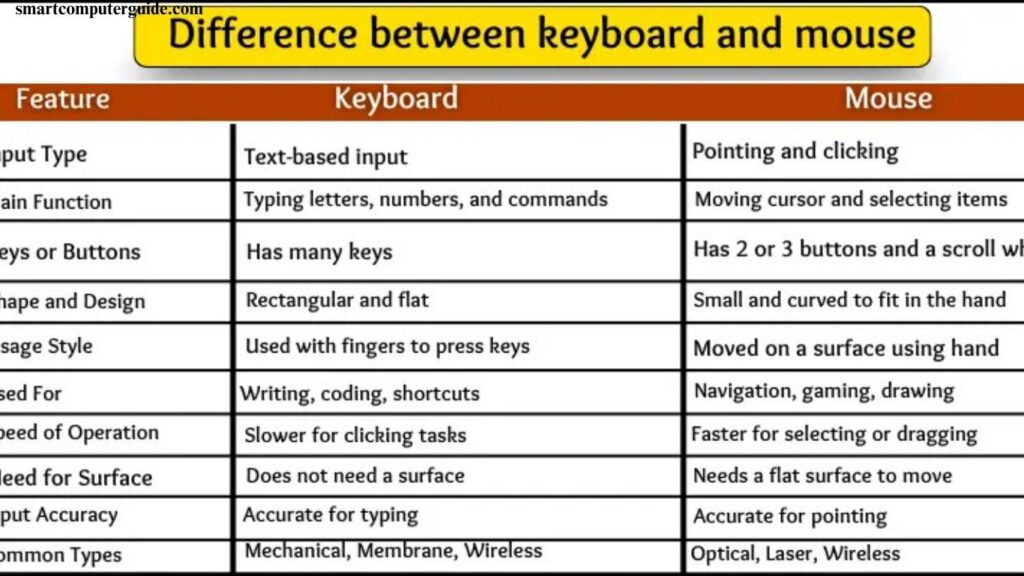
The difference between keyboard and mouse is important to understand because both are input devices, but they work in very different ways. Below is a list of key differences between them:
- Input type
- Main function
- Number of keys or buttons
- Shape and design
- Usage style
- Used for different tasks
- Speed of operation
- Need for surface
- Input accuracy
- Common types
Input Type
Keyboard and mouse provide input to a computer in different ways. Both devices are essential, but each works with a unique method to help users perform tasks easily.
Keyboard
A keyboard allows users to enter text, numbers, and symbols by pressing keys. Every key sends a signal to the computer, making it useful for typing, writing documents, using shortcuts, and giving commands quickly and accurately.
Mouse
A mouse controls the movement of the cursor on the screen. Users click, drag, and scroll to interact with items. It helps with pointing, selecting options, opening files, and navigating visually through programs.
Main Function
Each input device has a specific role, and the keyboard and mouse support the computer in different ways.
Keyboard
The keyboard’s main function is typing. Users press keys to enter letters, numbers, and commands. It allows direct communication with the computer through text and is essential for writing, searching, and data entry.
Mouse
The mouse’s main function is pointing. It controls the on-screen cursor and helps users click, select, open, and move items. It makes visual navigation and interaction with software simple and efficient.
Number of Keys or Buttons
The keyboard and mouse differ greatly in the number of keys or buttons they have, which affects how they are used.
Keyboard
A keyboard contains many keys with letters, numbers, and symbols. It also includes special keys such as Enter, Spacebar, Backspace, and function keys. Each key performs a specific action, allowing users to complete different tasks efficiently.
Mouse
A mouse usually has two or three buttons. Most mice include a left button, a right button, and a scroll wheel. These buttons help users click, select, scroll, and control items easily.
Shape and Design
The keyboard and mouse have very different shapes, making them easy to recognize at a glance.
Keyboard
A keyboard is long and flat, designed like a board with many keys. It is usually placed in front of the computer screen and stays in one position while you type.
Mouse
A mouse is small and oval-shaped, designed to fit comfortably in the hand. It is moved across a table or mouse pad and is built for smooth and easy hand movement.
Usage Style
Keyboard and mouse are used in different ways, even though both require hand movement.
Keyboard
The keyboard is used by pressing keys with the fingers. Hands usually stay in one place while only the fingers move. Users focus on the screen as they type, and the keyboard remains stationary.
Mouse
The mouse is controlled by moving the hand across a surface. Hand movement guides the on-screen pointer, while clicking and dragging perform actions. It needs free space to move smoothly.
Used for Different Tasks
The keyboard and mouse are designed for different types of computer tasks, and each plays an important role.
Keyboard
The keyboard is mainly used for typing text such as names, messages, and answers. It helps with writing emails, completing homework, and using keyboard shortcuts to work faster.
Mouse
The mouse is used for clicking folders, opening programs, moving images, and playing games. It is useful for drawing, dragging items, selecting options, and pointing accurately on the screen.
Speed of Operation
Keyboard and mouse operate at different speeds, depending on the task and user control.
Keyboard
Typing on a keyboard can be very fast once you know the keys. Fingers move quickly while hands stay in place, allowing rapid input of text, numbers, and commands without moving the device.
Mouse
The mouse’s speed depends on hand movement and screen navigation. Moving, clicking, and dragging items require physical motion across a surface, making it slightly slower for text input but faster for pointing, selecting, and controlling on-screen elements.
Need for Surface
Keyboard and mouse have different surface requirements to function properly.
Keyboard
A keyboard can be placed on any flat surface and stays in one position while typing. It does not require extra space to move and works steadily in its spot.
Mouse
A mouse needs a smooth, flat surface to operate. It cannot be used in the air or on soft surfaces like a bed. For accurate movement and control, it works best on a table or a mouse pad.
Input Accuracy
Accuracy is important when using input devices, as small mistakes can affect results.
Keyboard
The keyboard provides precise input when the correct keys are pressed. A single wrong key can change the meaning, such as typing “cat” instead of “bat.” Mistakes often require corrections through backspacing or retyping.
Mouse
The mouse also relies on accurate clicks. Clicking the wrong icon may open the wrong file, but errors are easier to fix by simply clicking the correct item. It is forgiving for small mistakes compared to typing errors.
Common Types
Keyboards and mice come in various types, ranging from traditional to modern designs.
Keyboard
- Wired Keyboard: Connects via a cable.
- Wireless Keyboard: Works without wires.
- Mechanical Keyboard: Produces a clicky sound when typing.
- Membrane Keyboard: Features soft and quiet keys.
Mouse
- Optical Mouse: Uses light to detect movement.
- Laser Mouse: Operates with a laser beam for precision.
- Wired Mouse: Connects with a cable.
- Wireless Mouse: Works without wires, powered by a battery.
These types help users choose devices based on comfort, speed, and functionality.
Frequently Asked Questions
What is the main difference between a keyboard and a mouse?
A keyboard is used for typing text and commands, while a mouse is used for pointing, clicking, and navigating on-screen items.
How many keys does a keyboard usually have?
Standard keyboards have 104 keys, including letters, numbers, symbols, and special function keys.
How many buttons does a mouse typically have?
Most mice have two buttons and a scroll wheel, though some advanced mice may have additional buttons.
Can a keyboard work without a surface?
Yes, a keyboard stays in one position and doesn’t require extra space to function.
Does a mouse need a flat surface to work?
Yes, a mouse works best on a smooth surface or mouse pad for accurate movement.
Which device is faster for typing or data input?
The keyboard is faster for typing and entering data, while the mouse is faster for navigating and selecting items.
Are wireless keyboards and mice reliable?
Yes, wireless keyboards and mice offer flexibility and convenience, though they require batteries.
What are the common types of keyboards and mice?
Keyboards: wired, wireless, mechanical, membrane. Mice: wired, wireless, optical, laser.
Which device is more prone to input mistakes?
Keyboards require more precision when typing, while mouse mistakes can be easily corrected by re-clicking.
Conclusion
The keyboard and mouse are essential input devices that serve different purposes. Keyboards excel at typing, entering data, and using shortcuts, while mice are ideal for pointing, clicking, dragging, and navigating visually. Each device has unique features, shapes, and usage styles, making them suitable for specific tasks. Understanding their differences helps improve accuracy, speed, and overall computer efficiency.