
Choosing the right computer speakers can be tricky with so many options like 2.0, 2.1, and Bluetooth models. Each type offers different sound quality, bass performance, and connectivity features. A 2.0 setup is ideal for basic stereo sound, while 2.1 speakers add a subwoofer for richer bass. Bluetooth speakers offer wireless convenience, perfect for clutter-free desks or portable use. Understanding your needs, desk space, and audio preferences will help you pick the best option. This guide breaks down the types of computer speakers, their benefits, and which setup suits your lifestyle, making your choice simple and informed.
Read More: Key Functions of RAM in Computers
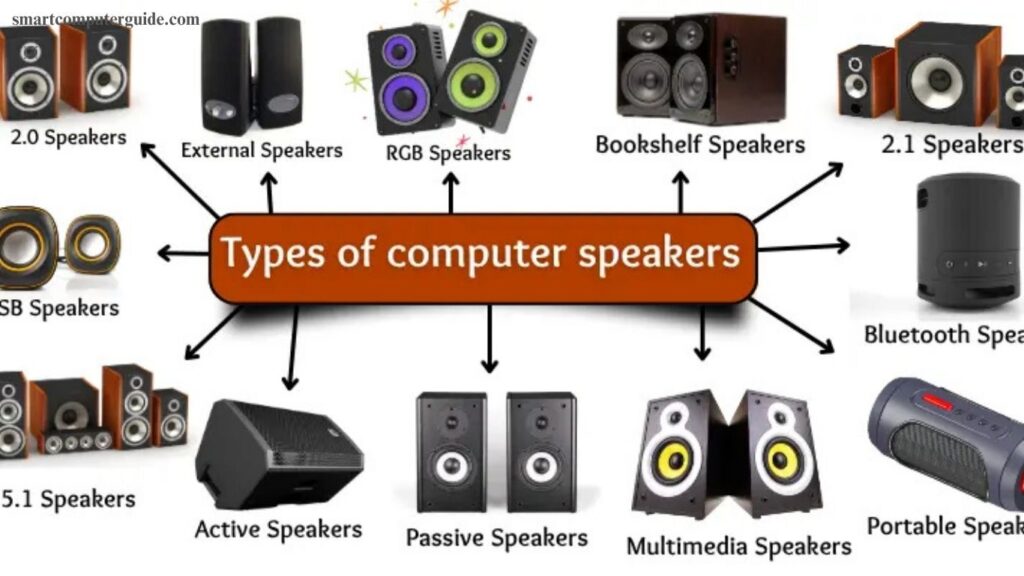
Types of Computer Speakers
Computer speakers come in various types to suit different audio needs and setups. Popular options include:
- 2.0 Speakers
- 2.1 Speakers
- 5.1 Speakers
- Bluetooth Speakers
- USB Speakers
- Portable Speakers
- Multimedia Speakers
- Bookshelf Speakers
- External Speakers
- Soundbars
- RGB Speakers
- Active Speakers
- Passive Speakers
Choosing the right type ensures the best sound quality and performance for work, gaming, or entertainment.
2.0 Speakers
2.0 speakers are the simplest option, featuring two small units placed on either side of your monitor. They deliver clear, straightforward audio, perfect for daily tasks, videos, or soft music.
2.1 Speakers
2.1 speakers include two main speakers and a subwoofer, producing deeper, more powerful bass. Ideal for music and gaming, they create a richer and louder audio experience.
5.1 Speakers
5.1 speaker systems feature five speakers and a subwoofer, providing immersive surround sound. Perfect for movies and games, they make audio feel more dynamic and realistic.
Bluetooth Speakers
Bluetooth speakers connect wirelessly, offering portability and flexibility. Ideal for home, school, or outdoor use, they deliver good sound without cable clutter.
USB Speakers
USB speakers draw both power and audio through a single USB connection. They are easy to set up, making them convenient for work, study, or casual listening.
Portable Speakers
Lightweight and small, portable speakers can be carried anywhere. Compatible with laptops, phones, and tablets, they provide good sound without occupying much space.
Multimedia Speakers
Multimedia speakers are designed for music, movies, and gaming. Their compact design makes them easy to set up and use in various settings.
Bookshelf Speakers
Bookshelf speakers are medium-sized units that fit on a table or shelf. They deliver clear, powerful audio, ideal for music, movies, and small-room setups.
External Speakers
External speakers are standalone units that provide louder, higher-quality sound than built-in options. They enhance music, movies, and gaming experiences.
Soundbars
Soundbars are long, slim speakers placed under monitors or TVs. They deliver clear, wide sound while saving desk or floor space, enhancing movies and music.
RGB Speakers
RGB speakers feature colorful lights that sync with music. Popular among gamers and party setups, they add a visual flair to your computer audio.
Active Speakers
Active speakers come with a built-in amplifier, requiring no additional equipment. They provide strong audio for music, movies, or gaming with easy setup.
Passive Speakers
Passive speakers need an external amplifier or receiver to operate. When set up correctly, they deliver high-quality, powerful sound, ideal for home theaters or large rooms.
Frequently Asked Questions
What are 2.0 speakers used for?
2.0 speakers are basic stereo speakers ideal for daily work, videos, and soft music. They provide clear, simple sound.
How are 2.1 speakers different from 2.0?
2.1 speakers include a subwoofer, giving deeper bass and richer audio. They are perfect for music and gaming.
What makes 5.1 speakers special?
5.1 speakers provide surround sound with five speakers and a subwoofer, creating an immersive experience for movies and gaming.
Are Bluetooth speakers good for computers?
Yes, Bluetooth speakers offer wireless convenience, portability, and decent sound quality, suitable for home, school, or outdoor use.
Can USB speakers work without an adapter?
Yes, USB speakers draw power and sound directly from the USB port, making setup simple and convenient.
What are the advantages of active speakers?
Active speakers have a built-in amplifier, so they don’t need extra equipment. They deliver strong, ready-to-use audio.
When should I use passive speakers?
Passive speakers require an external amplifier or receiver. They are ideal for home theaters or large rooms where powerful sound is needed.
Conclusion
Choosing the right computer speakers depends on your needs, space, and audio preferences. From basic 2.0 units to immersive 5.1 setups, wireless Bluetooth options, and stylish RGB models, each type offers unique benefits. Understanding their features ensures you get the best sound quality for work, gaming, or entertainment.