
Experiencing slow internet or connectivity issues at your office? The problem might stem from your network’s structure. Understanding network topologies can help identify bottlenecks and improve performance. Network topology defines how devices like computers, routers, and switches connect and communicate.
Common types include star, bus, ring, mesh, and hybrid topologies, each offering distinct advantages for speed, reliability, and scalability. By learning how these topologies work, you can troubleshoot issues more effectively, optimize your network layout, and ensure smoother data flow. This guide explains network topologies clearly, helping you enhance your network performance.
Read More: Firewalls in Computer Networks
Different Types of Network Topologies
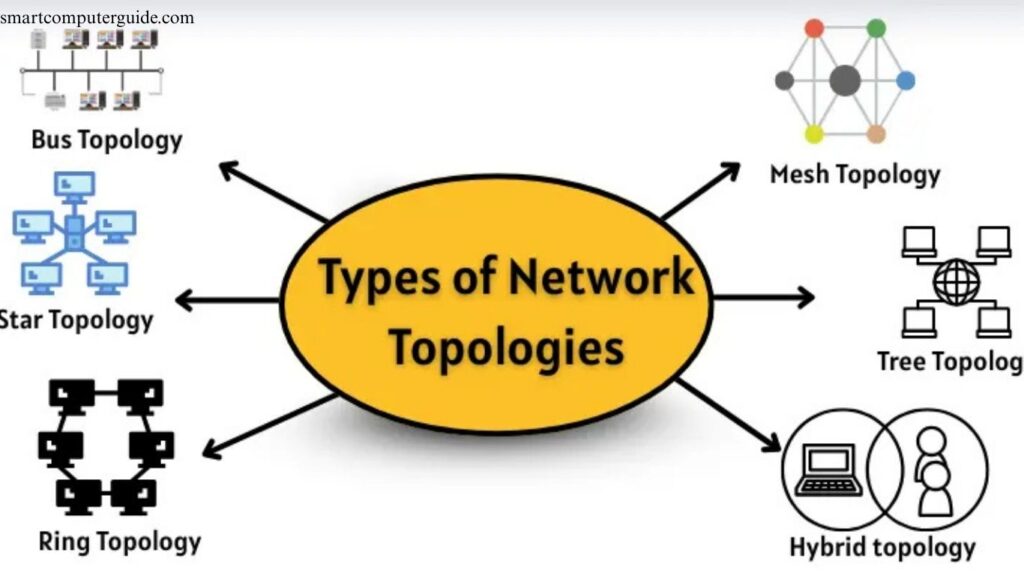
Network topology defines how computers and devices connect and communicate within a network. Each method of connection is a specific type of topology. The main types include:
- Bus Topology
- Star Topology
- Ring Topology
- Mesh Topology
- Tree Topology
- Hybrid Topology
Bus Topology
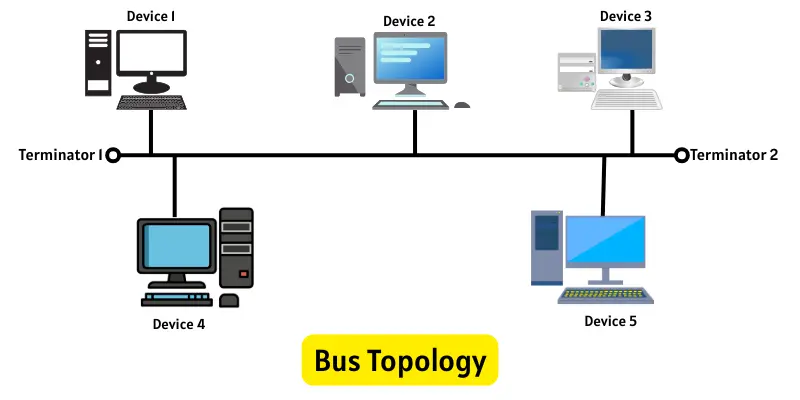
In a bus topology, all devices connect to a single central cable that serves as the network’s communication path. When a device sends data, it attaches the target address to the signal. Each device checks the address; the correct one receives the data while others ignore it. Terminators at both ends prevent signal reflection, and only one device can transmit at a time to avoid collisions. This simple layout is cost-effective but can slow down as more devices are added.
Uses of Bus Topology
Bus topology is simple and best suited for small networks. Common uses include:
- Small home or office networks
- Schools or offices needing a low-cost setup
- Situations where few computers share data
- Temporary or quick team networks
Advantages of Bus Topology
- Requires fewer cables
- Quick and easy to install
- Performs efficiently in small networks
Disadvantages of Bus Topology
- Entire network fails if the main cable breaks
- Only one device can transmit at a time
- Performance slows as more devices are added
Star Topology
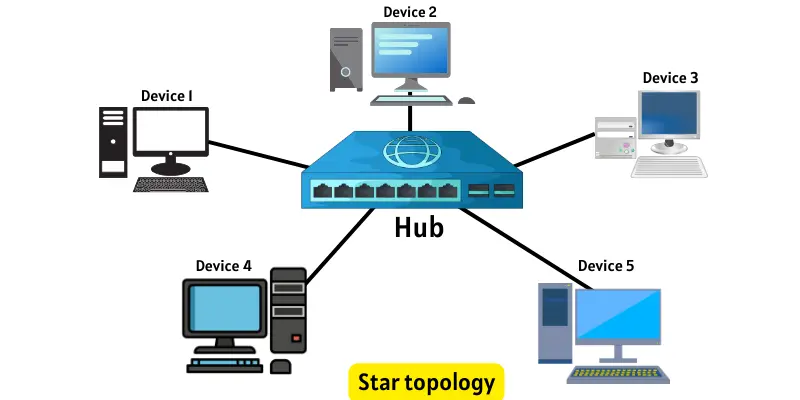
In a star topology, all devices connect to a central hub or switch, which manages all data traffic. When a device sends information, the hub directs it to the intended recipient. Communication passes exclusively through this central point. If one device fails, the network continues to operate normally, but if the hub fails, the entire network is affected.
Uses of Star Topology
Star topology is reliable and easy to manage, making it ideal for:
- Schools and offices needing stable networks
- Homes for Wi-Fi and wired connections
- Shops and small businesses for simple network management
- Networks with many devices connecting to a single point
Advantages of Star Topology
- One device failure doesn’t affect the whole network
- Easy to set up and manage
- Supports high-speed communication
Disadvantages of Star Topology
- Central device failure stops the network
- Requires more cabling than simpler topologies
- Cost increases as more devices are added
Ring Topology
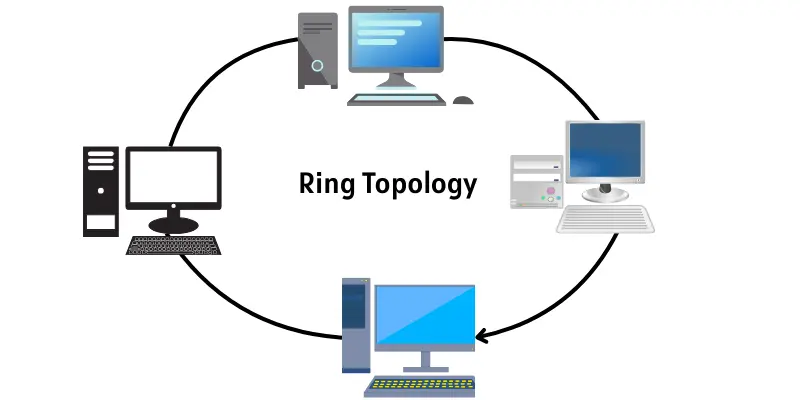
In a ring topology, devices connect in a closed loop, forming a circle. Data travels in one direction, passing through each device sequentially. Each device forwards data to the next, creating an organized flow. A single device failure can disrupt the entire network unless special mechanisms maintain the connection.
Uses of Ring Topology
Ring topology works best where data must follow a specific path:
- Networks requiring a clear, structured data flow
- Small to medium-sized offices
- Companies needing steady, uninterrupted communication
- Systems that transmit data in one direction
Advantages of Ring Topology
- Equal access for all devices
- Organized, predictable data flow
- Handles small increases in devices without major slowdowns
Disadvantages of Ring Topology
- Network stops if one device fails
- Adding devices is challenging
- Troubleshooting can be time-consuming
Mesh Topology
In a mesh topology, every device connects directly to all other devices. Data can travel along multiple paths, so if one path fails, another takes over. This design makes the network highly reliable and fault-tolerant.

Uses of Mesh Topology
Mesh topology is ideal for networks that require strong and uninterrupted connections:
- Critical systems needing nonstop connectivity
- Large companies for secure data transfer
- Networks that cannot afford downtime
- Smart homes and Wi-Fi systems for full coverage
Advantages of Mesh Topology
- Network continues even if one link fails
- Highly reliable connections
- Multiple paths for data transmission
Disadvantages of Mesh Topology
- Requires many cables
- Expensive to install
- Complex to manage in large networks
Tree Topology
Tree topology combines star and bus topologies. Small star networks connect to a main bus, forming a branching structure like a tree. Data flows both upward and downward. If one device fails, some parts of the network can still operate.

Uses of Tree Topology
Tree topology is ideal for large, hierarchical networks:
- Schools connecting multiple computer labs
- Offices linking several small groups of computers
- Networks that grow gradually
- Large networks requiring multiple levels of organization
Advantages of Tree Topology
- Easily expandable without disrupting structure
- Clear and organized layout
- Supports many devices simultaneously
Disadvantages of Tree Topology
- Requires more wiring than simpler topologies
- Management becomes harder as the network grows
Hybrid Topology
Hybrid topology combines two or more network types, such as star, bus, ring, or mesh. This approach makes the network flexible, with data flowing through connected sections. If one part fails, the rest can continue operating.

Uses of Hybrid Topology
Hybrid topology is ideal for large, complex networks:
- Big companies combining multiple topologies
- Departments with different networking needs
- Networks requiring both flexibility and reliability
- Very large or complex systems
Advantages of Hybrid Topology
- High performance and reliability
- Easily expandable without redesigning the network
- Combines the strengths of multiple topologies
Disadvantages of Hybrid Topology
- Higher installation cost than simpler setups
- Requires skilled management
- Planning and design take more time
Frequently Asked Questions
What is a network topology?
Network topology defines how computers and devices are connected and communicate within a network.
How many types of network topologies exist?
The main types are Bus, Star, Ring, Mesh, Tree, and Hybrid topologies.
Which topology is best for small networks?
Bus and Star topologies are ideal for small networks due to simplicity and low cost.
Which topology is most reliable?
Mesh topology is the most reliable because data can travel multiple paths if one link fails.
What are the advantages of Star topology?
Star topology is easy to set up, supports high-speed communication, and one device failure doesn’t affect the network.
What is the disadvantage of Ring topology?
A single device failure can disrupt the entire network unless backup mechanisms are used.
Where is Tree topology used?
Tree topology is common in schools, offices, and large networks requiring hierarchical connections.
What is Hybrid topology?
Hybrid topology combines two or more network types to provide flexibility, scalability, and performance.
How to choose the right network topology?
Consider network size, reliability, cost, and management complexity to select the most suitable topology.
Conclusion
Understanding network topologies is essential for designing efficient and reliable networks. Each topology Bus, Star, Ring, Mesh, Tree, and Hybrid has its own strengths, weaknesses, and ideal use cases. Small networks benefit from simple layouts like Bus or Star, while large or critical networks require Mesh or Hybrid topologies for reliability and scalability. Choosing the right topology depends on factors like network size, cost, and performance needs.