
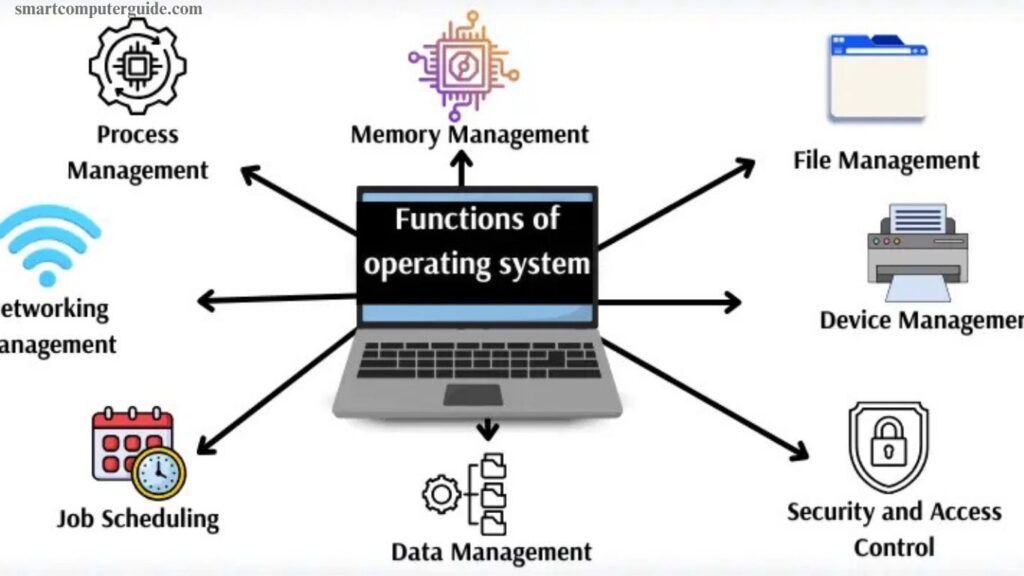
An operating system (OS) is the backbone of any computer, managing hardware and software seamlessly. It controls memory, processes, and storage while providing a user-friendly interface. Key functions include task scheduling, resource allocation, and file management, ensuring smooth performance. The OS also handles security, preventing unauthorized access and protecting data.
It enables communication between applications and hardware, allowing programs to run efficiently. For beginners, understanding these functions is crucial to grasp how computers operate. Mastering OS basics improves troubleshooting, enhances productivity, and lays the foundation for learning advanced computing concepts.
Read More: Android Application Testing: Key Insights You Must Know
What Are the Functions of an Operating System?
An operating system (OS) is the core software that runs a computer, coordinating all hardware and software tasks. Its main responsibilities, known as OS functions, ensure the system operates efficiently and reliably.
Key Functions of an Operating System
The OS manages files, memory, programs, and devices, allowing users to interact with the computer seamlessly. It handles task scheduling, resource allocation, and security, ensuring smooth performance. By organizing system resources effectively, the operating system makes computing easier, faster, and more reliable for everyone.
- Process Management
- Memory Management
- File Management
- Device Management
- Security and Access Control
- User Interface Management
- Networking Management
- Job Scheduling
- Error Detection and Handling
- Resource Allocation
- Command Interpretation
- Data Management
- Performance Monitoring
1. Process Management
Process Management controls how programs run, ensuring each gets proper CPU time and preventing crashes.
Example: Opening a browser and music player together runs smoothly thanks to process management.
2. Memory Management
Memory Management allocates memory for each program, keeping them fast and preventing overlap.
Example: Playing a game while browsing works efficiently because memory is properly distributed.
3. File Management
File Management organizes, stores, and secures files. It allows easy creation, opening, saving, and deletion.
Example: Saving homework ensures it goes to the correct folder for easy access later.
4. Device Management
Device Management controls hardware like keyboards, printers, and monitors, ensuring proper operation and communication.
Example: Printing a photo works perfectly as the printer receives the correct data.
5. Security and Access Control
This function protects the system from unauthorized access, viruses, and hackers.
Example: Logging in with a password ensures only authorized users access the account.
6. User Interface Management
UI Management makes the system easy to navigate through menus, icons, and windows.
Example: Clicking a game icon opens it with clear buttons and controls.
7. Networking Management
Networking Management handles data transfer and connections with other computers and the Internet.
Example: Sending an email reaches the recipient quickly and securely.
8. Job Scheduling
Job Scheduling organizes program execution to prioritize important tasks and reduce delays.
Example: Downloading a file while gaming runs smoothly without lag.
9. Error Detection and Handling
This function detects mistakes in programs, files, or hardware and helps fix them to prevent crashes.
Example: A corrupted file triggers warnings and recovery options.
10. Resource Allocation
Resource Allocation assigns CPU, memory, and storage efficiently, ensuring all programs work properly.
Example: Watching a video while editing a photo runs smoothly without slowing the system.
11. Command Interpretation
Command Interpretation reads user instructions and executes them correctly.
Example: Typing a command to open a folder immediately opens it.
12. Data Management
Data Management organizes, tracks, and secures information for quick and accurate access.
Example: Saving a school project ensures it is stored correctly for later use.
13. Multitasking Management
Multitasking Management allows multiple programs to run at the same time efficiently.
Example: Listening to music, browsing, and typing simultaneously works without slowing down.
14. Performance Monitoring
Performance Monitoring tracks CPU, memory, and program performance to maintain speed and efficiency.
Example: Identifying which program uses too much memory helps prevent slowdowns.
Frequently Asked Questions
What is an operating system?
An operating system (OS) is the core software that manages a computer’s hardware and software, allowing programs to run efficiently.
What are the main functions of an operating system?
The OS handles process management, memory management, file management, device management, security, multitasking, networking, and performance monitoring.
How does process management work?
Process management controls program execution, allocates CPU time, and prevents programs from crashing while running simultaneously.
Why is memory management important?
Memory management ensures each program gets enough memory, preventing slowdowns and avoiding conflicts between programs.
How does file management help users?
File management organizes, stores, and protects files, making it easy to save, open, and locate documents.
What role does security and access control play?
It protects the computer from unauthorized access, viruses, and hackers, ensuring that only authorized users can access data.
How does multitasking work in an OS?
Multitasking allows multiple programs to run at the same time without slowing down, allocating resources efficiently to each application.
What is performance monitoring?
Performance monitoring tracks CPU, memory, and program usage to detect issues, improve speed, and maintain smooth operation.
Conclusion
The operating system is the backbone of every computer, managing hardware, software, and user interactions efficiently. Its key functions—such as process management, memory allocation, file handling, security, multitasking, and networking—ensure smooth performance and reliability. Understanding these functions helps beginners use computers effectively, troubleshoot issues, and optimize system performance.