
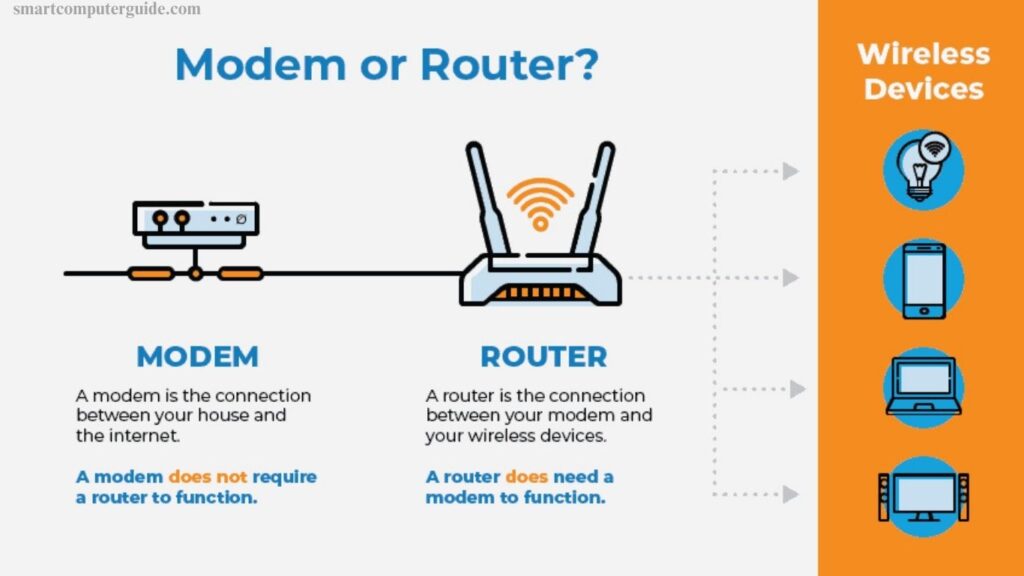
A modem links your home to the internet, while a router distributes that connection to multiple devices. Many users rely on both without fully understanding their distinct roles. Knowing the difference between a router and a modem is essential for students, beginners, and anyone curious about how networks operate. This knowledge helps troubleshoot connectivity issues, optimize home networks, and choose the right equipment.
For a deeper understanding, explore our comprehensive guide on the Components of a Computer Network, which explains each device’s function and how they work together to deliver seamless internet access.
Read More: Boot sector virus – A Detail Guide for Beginners
Difference Between Router and Modem
A modem and a router are both essential for internet access, but they serve different purposes. A modem connects your home to the internet, while a router distributes that connection to multiple devices. Understanding their differences helps in setting up and managing networks efficiently.
- Function
- Device Type
- Internet Requirement
- Connection Type
- Number of Devices
- IP Address
- Security
- Network Creation
- Speed Distribution
- Cost
Function of Router and Modem
Routers and modems are essential for internet access, but each serves a different purpose.
Router: A router shares the internet with multiple devices, allowing phones, tablets, and laptops to connect simultaneously. It enables devices to communicate within the network and secures your connection with passwords and encryption.
Modem: A modem connects your home to the internet by linking to your Internet Service Provider (ISP). Typically, only one device can connect directly. Unlike a router, a modem does not manage multiple devices or create a local network.
Device Type: Router vs Modem
Routers and modems are different types of devices, each with a distinct role in connecting to the internet.
Router: A router is a network device that manages all devices in your home. It distributes internet to phones, laptops, and tablets and allows them to communicate with each other within the network.
Modem: A modem is a single-connection device that links your home to your Internet Service Provider (ISP). Typically, only one device can connect directly, and it does not manage multiple devices or create a local network.
Internet Requirement
Both routers and modems need power to operate, but they handle internet access differently.
Router: A router can create a local network without a modem, allowing devices in your home to connect to each other. It only shares internet if connected to a modem and does not receive the internet directly from your provider.
Modem: A modem always requires an active internet service from your Internet Service Provider (ISP). It brings the internet into your home but cannot share it across devices on its own.
Connection Type
Routers and modems connect to the internet differently, serving unique purposes.
Router: A router links devices via Wi-Fi or Ethernet, allowing multiple devices to access the internet simultaneously. It also enables fast data transfer between devices, and you can move devices freely within its range.
Modem: A modem connects to the internet through cable, DSL, or fiber lines, usually supporting only one device directly. Its primary role is to bring the internet from your provider, but it cannot distribute it to multiple devices on its own.
Number of Devices
Routers and modems connect devices differently.
Router: A router supports multiple devices at once, allowing phones, tablets, and laptops to access the internet simultaneously. It manages traffic to ensure smooth performance across all devices.
Modem: A modem typically connects only one device directly. It brings the internet from your provider but does not manage or share the connection with multiple devices.
IP Address
Routers and modems handle IP addresses differently.
Router: A router assigns each device a private IP address, enabling secure communication between devices and sharing the internet efficiently across all connected devices.
Modem: A modem receives a single public IP address from your Internet Service Provider (ISP) to connect your home to the internet. It does not assign separate addresses to individual devices.
Security
Routers and modems protect your network differently.
Router: A router provides robust security for all connected devices using passwords and encryption. It helps prevent unauthorized access and keeps your network safe.
Modem: A modem offers minimal security. Its main role is to bring the internet into your home, but it does not manage device access or provide protection for your network.
Network Creation
Routers and modems create networks in different ways.
Router: A router establishes a local network in your home, allowing devices to communicate, share files, and access the internet simultaneously.
Modem: A modem does not create a local network. Its sole function is to bring internet from your provider, and devices cannot interact with each other using only a modem.
Speed Distribution
Routers and modems distribute internet speed differently.
Router: A router shares internet speed among multiple devices, ensuring phones, tablets, and laptops all get a portion while managing traffic for smooth performance.
Modem: A modem delivers full internet speed to a single device at a time. It cannot distribute or manage speed for multiple devices, as its primary role is to provide the internet from your service provider.
Cost
Routers and modems differ in price due to their features.
Router: Routers typically cost more because they include Wi-Fi, security, and network management features, allowing multiple devices to connect and communicate smoothly.
Modem: Modems are generally less expensive. Their main function is to bring internet from your provider, and they lack additional features for device management or network security.
Frequently Asked Questions
What is the main difference between a router and a modem?
A modem connects your home to the internet, while a router shares that connection with multiple devices and creates a local network.
Can a router work without a modem?
Yes, a router can create a local network without internet access, but it cannot provide internet without a modem or direct connection.
How many devices can a modem support?
Typically, a modem supports only one device directly. Multiple devices require a router to share the internet.
How does a router assign IP addresses?
A router assigns private IP addresses to each device, enabling secure communication and network management.
Does a modem provide network security?
No, modems offer minimal security. Routers provide encryption, firewalls, and password protection for devices.
How do routers and modems handle internet speed?
A modem delivers full speed to one device, while a router distributes and manages speed across multiple devices.
What types of connections do routers and modems use?
Routers connect devices via Wi-Fi or Ethernet, while modems connect to the internet via cable, DSL, or fiber.
Which device is more expensive, a router or a modem?
Routers usually cost more due to additional features like Wi-Fi, security, and traffic management. Modems are generally less expensive.
Conclusion
Routers and modems are both essential for internet access, but they serve different roles. A modem connects your home to the internet, while a router distributes that connection to multiple devices, manages traffic, and provides security. Understanding their differences helps you set up efficient networks, optimize speed, and protect your devices. Choosing the right modem and router combination ensures seamless internet access for all devices in your home.