
Have you ever thought about how your computer produces sound or music? The key component is the computer speaker. A computer speaker is a device that converts digital audio signals into audible sound, allowing you to hear music, notifications, videos, and more. While many users rely on speakers daily, they often don’t fully understand how they work or their importance.
This beginner-friendly guide explains computer speakers clearly, covering their function, types, and uses. By the end, you’ll have a solid understanding of how these essential devices bring audio to life on your computer.
Read More: Types and Uses of Computer Mouse
What is a Computer Speaker?
A computer speaker is an output device that produces sound you can hear. It plays music, voices, notifications, and other audio from your system. Speakers connect via wires or Bluetooth, and most computers include either built-in or external options. These devices are essential for enjoying media, alerts, and interactive applications, making them a key part of any computer setup.
How Does a Computer Speaker Work?
A computer speaker produces sound by converting digital audio into sound we can hear. The process works in these steps:
- The computer generates sound data, such as music or voice.
- The sound data is sent to the sound card.
- The sound card converts digital signals into analog signals.
- The analog signal is sent to the speaker.
- The speaker amplifies the sound using power.
- The sound is delivered clearly for you to hear.
Types of Computer Speakers
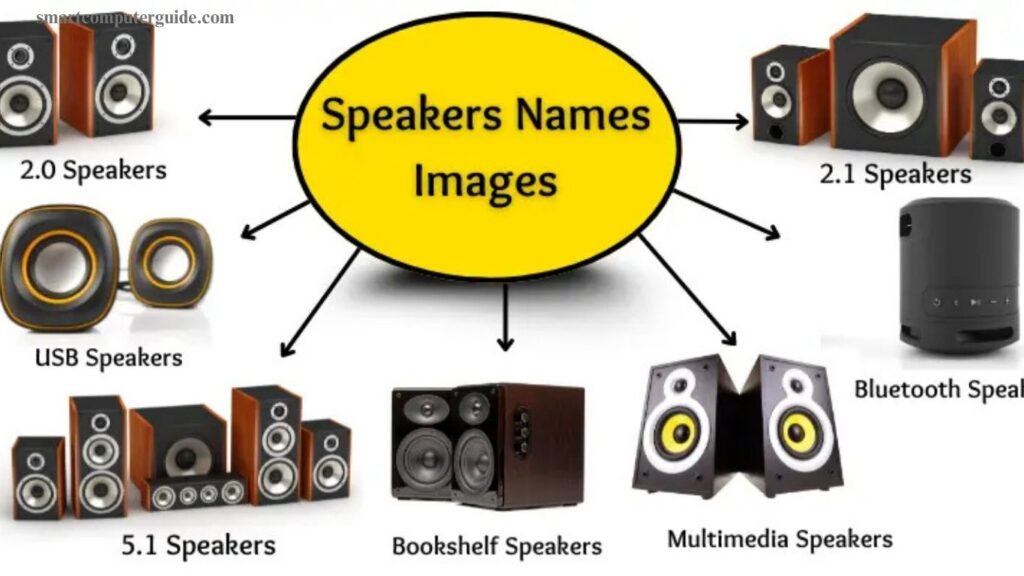
Computer speakers come in various types, each designed for specific uses and sound quality:
- 2.0 Speakers: Two basic speakers for simple audio.
- 2.1 Speakers: Two speakers plus a subwoofer for enhanced bass.
- 5.1 Speakers: Five speakers and a subwoofer for surround sound.
- Bluetooth Speakers: Wireless speakers that connect via Bluetooth.
- USB Speakers: Receive power and audio through a USB port.
- Portable Speakers: Small, lightweight, and easy to carry.
- Multimedia Speakers: Designed for music, movies, and gaming.
- Bookshelf Speakers: Medium-sized speakers for shelves or tables with good sound.
- External Speakers: Separate units for louder and higher-quality sound.
- Soundbars: Slim, space-saving speakers with clear audio.
- RGB Speakers: Feature colorful lights that react to sound.
- Active Speakers: Built-in amplifier, no extra system needed.
- Passive Speakers: Require an external amplifier to work.
Uses of Computer Speakers
Computer speakers allow us to hear sound clearly, making music, videos, games, and important notifications enjoyable and practical. Common uses include:
- Listening to Music: Play songs loudly and clearly.
- Watching Movies: Enhance the cinematic experience with realistic sound.
- Playing Games: Deliver immersive game audio.
- Video Calls: Hear friends, family, and colleagues clearly.
- Online Classes: Follow teachers and lectures easily.
- Alerts & Notifications: Receive important sound alerts.
- Presentations: Amplify your voice for audiences.
- Watching Tutorials: Understand instructional videos better.
- Voice Recording: Playback recordings clearly.
- Relaxation: Enjoy calming music for stress relief.
Parts of a Computer Speaker
A speaker has several key parts that work together to produce clear and loud sound:
- Cone: Moves back and forth to create sound waves.
- Magnet: Uses magnetic force to move the cone.
- Voice Coil: A wire coil that moves with electrical signals.
- Dust Cap: Protects the center of the cone.
- Spider: Holds the voice coil in place and ensures proper movement.
- Surround: Connects the cone to the frame, allowing smooth movement.
- Basket (Frame): Supports and holds all speaker components.
- Terminal: Connects the speaker wires to the device.
Advantages and Disadvantages of Computer Speakers
Computer speakers let us hear audio clearly, but they have both pros and cons.
Advantages:
- Easy to use for music, videos, and games.
- Useful for online calls, meetings, and classes.
- Available in various sizes and types.
- Can be wired or wireless for flexibility.
Disadvantages:
- Can disturb others in shared spaces.
- Some require extra power to operate.
- High-end models can be expensive.
- Large speakers occupy significant space.
- Wireless speakers may occasionally disconnect.
Frequently Asked Questions
What is a computer speaker?
A computer speaker is an output device that produces sound from your computer.
How do computer speakers work?
They convert digital audio signals from the computer into audible sound waves.
What are the main types of computer speakers?
Types include 2.0, 2.1, 5.1, Bluetooth, USB, portable, multimedia, bookshelf, soundbars, RGB, active, and passive speakers.
What are the key parts of a speaker?
Cone, magnet, voice coil, dust cap, spider, surround, basket, and terminal.
Can speakers be wired and wireless?
Yes, speakers can connect via wires, USB, or wirelessly through Bluetooth.
What are the advantages of computer speakers?
They provide clear audio, support media, calls, and come in various sizes and types.
What are the disadvantages of computer speakers?
Some can disturb others, require extra power, be expensive, or occupy space.
What are multimedia speakers used for?
They enhance music, movies, and gaming experiences.
Can I use external speakers with any computer?
Yes, as long as your computer has compatible ports or Bluetooth support.
Conclusion
Computer speakers are essential devices that bring sound to life, enhancing music, videos, games, calls, and more. From basic 2.0 models to advanced surround sound systems, each type serves a specific purpose. Understanding their parts, types, uses, and advantages helps you choose the right speaker for your needs. Whether wired or wireless, speakers improve your computing experience by delivering clear, immersive audio, making them a vital component of any computer setup.