
Output devices are essential components of a computer system that allow users to receive information from the computer. They convert processed data into a form that humans can understand, such as visual, audio, or printed output. Common examples include monitors, printers, speakers, and projectors.
These devices play a vital role in everyday computing, enabling tasks like viewing documents, listening to audio, or producing hard copies. Understanding output devices helps users choose the right tools for work, education, and entertainment, making computer interactions more efficient and effective.

Read More: Different Types of CPU
What Are Computer Output Devices?
Output devices allow users to receive information from a computer in a usable form. When you type or execute a command, the computer processes the data and sends it to an output device. This lets you see results on a monitor, hear sounds through speakers, or get printed documents from a printer. Common output devices include monitors, printers, speakers, and projectors, all of which make computer interactions more effective and user-friendly.
Importance of Output Devices
Output devices are essential components of a computer, allowing users to receive and understand processed information. They display results visually, play audio, and produce printed documents.
Key Importance:
- Show the results of computer tasks
- Enable listening to sounds, music, and alerts
- Provide printed copies of documents
- Help users understand ongoing computer processes
- Allow effective interaction with and interpretation of information from the computer
Output devices make computing meaningful by transforming digital data into forms humans can see, hear, and use.
How Output Devices Work
Output devices take information from the computer and convert it into a form we can see, hear, or interact with. They don’t process data themselves—they only present the final result.
Step-by-Step Process:
- Computer Processes Data: The computer receives input, processes it, and prepares the final result.
- Send to Output Device: The processed data is sent to the connected output device, such as a monitor, speaker, or printer.
- Convert to Human-Readable Form: The device displays text, images, sound, or prints documents.
- User Receives Output: We can read, watch, listen, or collect printed results.
Output devices make digital information understandable and usable for humans.
Functions of Output Devices
Output devices help computers present results in ways humans can see, hear, or interact with. They convert digital information into understandable formats, making computing more effective and user-friendly.
Key Functions:
- Display Information: Show text, images, and videos on screens like monitors.
- Print Documents: Provide hard copies of files using printers.
- Project Visuals: Display content on large screens through projectors.
- Provide Physical Feedback: Generate physical signals, such as vibrations in game controllers.
- Support Communication: Facilitate video calls with visuals and sound using monitors and speakers.
These functions ensure users can interpret, use, and interact with computer output easily.
Uses of Output Devices
Output devices allow users to receive information from computers in a way they can see, hear, or interact with. They are widely used at home, in schools, and in offices to make computing easier and more effective.
Main Uses:
- Display Visuals: Show images, videos, and games on monitors.
- Play Audio: Speakers deliver music, voices, and alerts.
- Project Content: Projectors display visuals to larger audiences.
- Assist Presentations: Help teachers and professionals share information clearly.
- Provide Alerts: Some devices give sound or light warnings.
- Show Results: Display test scores, reports, and other outputs on screens.
These uses make output devices essential for everyday computing and communication.

Types of Output Devices
Output devices help us receive information from computers in different forms, including visuals, sound, and printed results. They are essential for interacting with and understanding computer output.
Visual Output Devices
Visual output devices display text, images, and videos from the computer, allowing users to see results on screens or monitors. Common visual output devices include monitors and projectors.
Monitors
A monitor is a screen that displays pictures, videos, and text from a computer, similar to a TV.
Importance:
- Shows everything done on the computer
- Lets you watch movies, read, or play games
- Helps navigate apps and programs
Types of Monitors:
- CRT Monitor: Older style with a bulky back
- LCD Monitor: Flat-screen, energy-efficient
- LED Monitor: Brighter and clearer than LCD

Projectors
Projectors display images or videos on large screens or walls, ideal for classrooms, offices, and entertainment.
Importance:
- Displays content to multiple people
- Useful for movies, lessons, or presentations
- Common in schools, offices, and events
Types of Projectors:
- LCD Projector: Uses a special screen to display images
- DLP Projector: Produces sharp images with light technology
- LED Projector: Bright, energy-saving display

Audio Output Devices
Audio output devices allow users to hear sounds from a computer by converting digital data into audio. They are essential for music, videos, games, and communication. Common audio output devices include speakers and headphones.
Speakers
Speakers play music, movies, and other sounds from a computer. They can be wired or wireless (Bluetooth).
Importance:
- Enjoy music, videos, and games
- Useful for meetings, presentations, and entertainment
- Enhances the overall computer experience
Types of Speakers:
- Wired Speakers: Connected via cables
- Wireless Speakers: Connect via Bluetooth
- Soundbars: Large speakers for powerful sound

Headphones
Headphones let users listen privately without disturbing others, making them ideal for gaming, studying, or online meetings.
Importance:
- Ideal for quiet environments
- Blocks external noise for better focus
- Supports gaming, online classes, and video calls
Types of Headphones:
- Wired Headphones: Connected via cable
- Wireless Headphones: Connect via Bluetooth
- Noise-Canceling Headphones: Reduce outside noise for clear sound

Print Output Devices
Print output devices convert digital data into paper copies, helping users keep a physical version of documents, images, or designs. Common print output devices include printers and plotters.
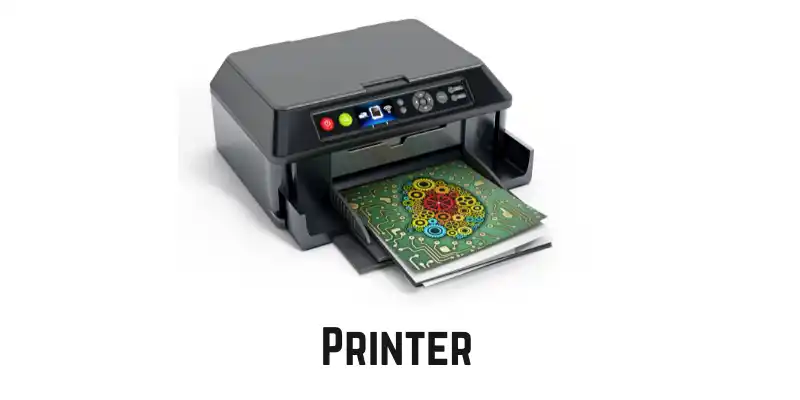
Printers
Printers create hard copies of digital files, making them ideal for school assignments, reports, artwork, and office documents.
Importance:
- Converts digital files into physical copies
- Prints homework, reports, and artwork
- Widely used in schools, offices, and homes
Types of Printers:
- Inkjet Printer: Best for colorful images
- Laser Printer: Fast and ideal for documents
- 3D Printer: Creates physical objects like toys or tools
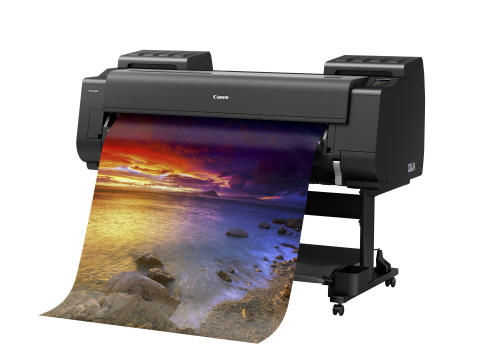
Plotters
Plotters are specialized printers used to produce large-scale drawings and designs, such as maps, posters, and engineering plans.
Importance:
- Prints large, detailed designs
- Useful in design, engineering, and architecture
- Ideal for professional large-format prints
Types of Plotters:
- Inkjet Plotter: Uses ink for large-scale images
- Laser Plotter: Uses laser technology for sharp, precise prints
Advantages and Disadvantages of Output Devices
Output devices allow users to see, hear, or receive the results of computer processing. They make interactions with computers easier but also have some limitations.
Advantages:
- Display results quickly and clearly
- Easy to share information
- Simplify computer use for students and professionals
- Assist people with disabilities
- Support presentations, videos, music, and gaming
- Produce printed documents efficiently
- Save time and enhance learning and creativity
- Improve design, editing, and online communication
Disadvantages:
- Can be expensive
- Require electricity and take up space
- Some are large, heavy, or fragile
- May need special software or maintenance
- Can cause eye strain, hearing issues, or noise
- Not all are portable or compatible with every computer
- Repairs or replacements can be costly
Output devices greatly improve user experience but need careful handling and proper maintenance.
Frequently Asked Questions
What are output devices?
Output devices are hardware components that allow users to receive information from a computer in visual, audio, or printed form.
What are the main types of output devices?
The main types include visual devices (monitors, projectors), audio devices (speakers, headphones), and print devices (printers, plotters).
How do output devices work?
They take processed data from the computer and convert it into a form humans can see, hear, or interact with, such as text, images, sound, or prints.
What are the advantages of output devices?
They display results quickly, improve communication, assist in learning, make presentations, and enhance gaming, music, and multimedia experiences.
What are the disadvantages of output devices?
Some devices can be expensive, require electricity, take up space, need maintenance, or cause eye and hearing strain.
What is the difference between input and output devices?
Input devices send data to the computer (like a keyboard), while output devices receive processed data from the computer (like a monitor).
Why are output devices important?
They make computer data usable, understandable, and interactive, allowing users to see, hear, or print results efficiently in work, education, and entertainment.
Conclusion
Output devices are vital components of a computer system, allowing users to see, hear, and interact with processed information. From monitors and projectors to speakers, headphones, printers, and plotters, each device serves a unique purpose. They enhance learning, communication, entertainment, and productivity by presenting data in human-understandable forms.